 Computers
 Wireless/Data
 TV/Monitor
 Projection
 Video
Video Audio
Audio Cameras
 AV Presentation
 PRINTERS/COPIERS
 TECH ACCESSORIES
 BRANDS WE CARRY
Clear, reliable sound is the foundation of any professional Boston presentation in 2026, whether you are addressing investors in a boardroom, running an innovation summit, or leading a training session. When attendees cannot hear the speaker, even the best content falls flat.
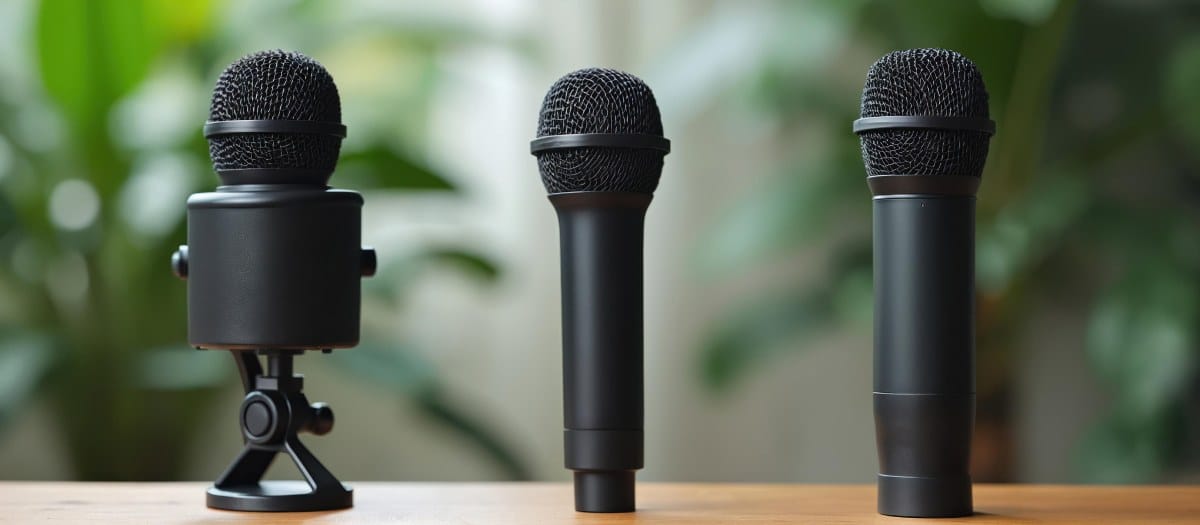
Microphones are either wired or wireless, and these are the two main options business presenters weigh when planning conferences, sales kickoffs, trade shows, and corporate events. Neither type is perfect for every situation. The right choice depends on your format, room size, and how interactive the session will be. This article covers how each option works, when each one fits best, what to consider for Boston venues, and how to avoid common problems.
OneStop AV rents wired microphones, wireless microphones, mixers, and speakers to Boston-area businesses. Call 1-800-782-1706 or request a quote to get started.
How Do Wired and Wireless Microphones Differ?
Both types convert a presenter’s voice into an electrical signal that is then amplified through a sound system. The core difference is how that signal travels from the microphone to the rest of your audio equipment. Understanding this helps you decide with confidence before your event date arrives.
Wired Microphones
Wired microphones connect directly to a mixer or powered speaker through a balanced XLR cable. This creates a simple, robust signal path that is unaffected by wireless congestion, which is valuable in busy downtown hotels where wireless traffic fills the airwaves.
Typical uses include podium mics for keynotes, gooseneck mics on lecterns, and handheld wired mics such as the Shure SM58 for Q&A in smaller rooms. Dynamic microphones are durable and well suited to live events, and most wired handhelds used at conferences are dynamic types. Condenser microphones are more sensitive, and some appear on lecterns when speech clarity is the priority.
Most wired microphones need no batteries, which supports reliability over long programs and all-day seminars. The trade-off is practical: cables need routing and taping for safety, and the presenter stays relatively close to the mic stand or podium.
Wireless Microphones
Wireless microphones use radio frequencies to send audio to a matched receiver near the mixer, replacing the physical cable. A typical setup includes a handheld transmitter or a bodypack paired with a lavalier or headset, plus the receiver unit. A system such as the Shure ULX-D pairs bodypack transmitters with lavalier mics and SM58 handheld transmitters, so one kit covers both styles.
Wireless microphones let speakers walk across a stage, step into the audience, or present in front of large displays without visible cables. They can also be affected by radio interference and by range limits, especially in older buildings with thick walls or metal structures. Antenna placement matters too, and tools such as a UHF antenna distribution system help keep reception consistent across a room. Battery management matters, so checking power levels before every session is a must.
Examples include wireless lavaliers for executive panels at a hotel or wireless handhelds for interactive breakout sessions at an industry conference.
👉Also Read: Why Are Boston Startups Choosing MacBook Rental for Project-Based Work?
Key Differences at a Glance
Mobility: Wired keeps speakers within cable reach, which is ideal for podiums. Wireless lets them roam freely across ballrooms or training spaces.
Connection: Wired uses a physical XLR cable. Wireless uses radio transmission to a receiver, which then connects to the mixer.
Setup: Wired is typically plug-and-play. Wireless needs more setup, including receiver placement, frequency selection, and range testing.
Power: Wired mics generally need no batteries. Wireless systems use batteries or rechargeable packs that must be checked before the event.
Best use cases: Wired for simple, stationary speaking. Wireless for dynamic presentations, product demos, and sessions where movement is part of the experience.
When Is a Wired Microphone the Better Choice?
Fixed podium presentations are best suited to wired microphones. In scenarios like podium addresses at Boston convention hotels, classroom-style training, board meetings, and brief announcements at corporate receptions, the speaker stays in one place, so cable length is not a concern and reliability is the priority. Pairing a wired mic with a lectern rental keeps the speaking position simple and professional.
Wired microphones are also generally more affordable than wireless options, which helps control costs for internal meetings and smaller events. Careful cable placement and taping along the front of a stage or conference room aisle keeps the setup clean and avoids trip hazards.
For hybrid events streamed from Boston offices, a wired mic into a small mixer or an audio interface such as the Behringer UM2 or the Shure X2U provides consistent sound with minimal troubleshooting, which keeps planning simple.
When Is a Wireless Microphone the Better Choice?
Dynamic presentations with audience interaction are best suited to wireless microphones. When your format calls for movement, engagement, or a cable-free stage look, wireless is the right call.
Examples include keynote speakers pacing across a stage, product demos that move between stations, or facilitators walking through audience seating during Q&A. For panel discussions, multiple wireless handhelds or lavaliers allow smooth hand-offs without tangling cables across a table. For roundtables and conference-style discussions, a wireless push-to-talk conference system is another option worth considering.
Wireless lavalier or headset microphones work well when presenters need both hands free to demonstrate software, handle props, or work at a flip chart. Many Boston corporate planners also prefer wireless setups for cleaner photos and video, with no visible cables in front of branded backdrops or displays.
That said, wireless is not automatically better. It adds batteries, frequencies, and receiver placement to manage, so it pays off most when the event format fully uses the mobility it provides.
What Should You Consider When Choosing a Microphone for a Boston Event?
Use these factors to narrow down the right choice for your venue and agenda.
Venue and Room Layout
Room size matters. A small conference accommodates well with a single wired mic, while a large ballroom may benefit from wireless to avoid long cable runs. Building construction, such as older stone or brick versus newer glass structures, can influence wireless range and should be tested during setup. Large convention halls with high ceilings and heavy echo require careful microphone and speaker placement, regardless of mic type.
Presenter Movement
Contrast a stationary podium speaker delivering quarterly results with a roaming trainer facilitating group activities. If the speaker plans to walk the stage or step into aisles, wireless is usually the better fit. If the agenda is lecture-style with slides from a single spot, a wired podium mic is simpler and more reliable. Ask presenters to confirm their preferred style early so your audio plan can match.
Number of Speakers
A single presenter at a small meeting can often use one wired mic. Multi-speaker panels benefit from multiple wireless handhelds or lavaliers for smooth transitions. In crowded venues, quality wireless systems are needed to avoid dropouts, and more wireless channels require more careful frequency planning. Keep an extra wired handheld ready as a backup in case a wireless battery dies mid-session.
Compatibility with Your AV Setup
Both wired and wireless mics ultimately connect to a mixer, powered speakers, or an installed sound system. Common Boston setups include portable PA systems, built-in hotel sound, and conference center patch panels. Wireless systems need available mixer inputs and space for receivers near the audio rack. Larger multi-mic events may call for a digital console such as the Behringer X32, while smaller meetings are often well served by a compact mixer like the Mackie 1202VLZ4.
Microphones also work alongside other presentation gear, including projectors, TV and monitor displays, and video conferencing systems for hybrid events.
Event Duration and Logistics
Longer events, such as full-day summits, multi-track conferences, and training days, call for careful planning around wireless battery life. Wireless microphones depend on fresh batteries or charging, so spares should always be on hand. Wired mics are low maintenance over long agendas. Venues with tight room-turn schedules may favor simpler wired setups if there is not enough time for thorough wireless checks.
How Can You Prevent Common Microphone Problems?
Use this checklist to minimize audio issues at your next Boston presentation:
- Test every microphone with the full system, including mixer, speakers, and any recording or streaming gear, before attendees arrive.
- Check cables for damage, make sure XLR connectors are firmly seated, and tape down any runs across walkways.
- Test wireless range at every point on stage and throughout the presentation area.
- Install fresh batteries before key sessions and keep spares within arm’s reach.
- Position microphones correctly: hold handhelds a few inches from the mouth, clip lavaliers at chest level, and avoid clothing rub or jewelry noise. A sturdy mic stand helps keep stationary mics at the right height.
- Keep backup options available, such as a spare wired handheld, extra cables, and additional batteries, especially for high-stakes corporate announcements.
- Avoid last-minute equipment changes without re-testing. Adding a wireless channel at the last minute in a busy hotel can introduce unexpected interference.
How Can OneStop AV Help With Your Boston Presentation?
OneStop Computer & Audio Visual Rentals is a Boston-area equipment rental company serving businesses, production companies, and event producers throughout the Northeast, with shipping available nationwide. Every piece of equipment goes through a multi-point inspection before it leaves and again when it returns.
OneStop AV rents wired microphones such as the Shure SM58, wireless systems such as the Shure ULX-D, mixers from Mackie and Behringer, QSC powered speakers, and Whirlwind XLR snakes and splitters.
Browse the full selection on the Boston audio equipment rentals page. You can pair your microphone rental with projectors, displays, laptops, lighting, and accessories, so one rental covers every gap in your AV setup. Rental periods are flexible, with daily, weekly, and monthly options.
At OneStop AV, our team can help you choose the right microphones, mixers, and speakers for your room and agenda, so you arrive at your event with equipment you can rely on.
👉Also Read: What Audiovisual Equipment Rentals Do You Need for a Multi-Day Conference in Boston?
Get the Right Microphones for Your Next Boston Event
The right microphone can make a noticeable difference in how clearly your presentation is heard. Whether you need wired microphones for a straightforward presentation or wireless options for a more interactive event, OneStop AV can help you choose the right audio equipment for your setup.
From microphones and speakers to laptops, Bluetooth keyboards, displays, and other AV equipment, OneStop AV provides the technology you need for presentations and events throughout the Boston area. Call 1-800-782-1706 or request a quote online to discuss your event requirements and secure the right equipment.
Key Takeaways
- Both wired and wireless microphones can deliver excellent results for Boston presentations. The best choice depends on presentation style, venue layout, and how much your speakers need to move.
- Wired microphones are usually the best fit for podium-style talks, lectures, and small corporate meetings where the speaker stays in one place and reliability matters most.
- Wireless microphones shine for mobile presenters, product demos, interactive sessions, and panel discussions where freedom of movement and a cable-free stage matter.
- Boston venues, from downtown hotel ballrooms to historic buildings, can introduce wireless interference and building-related challenges that should influence your decision.
Frequently Asked Questions
Do I Need a Wireless Microphone for a Small Boston Meeting Room?
For a small group in a standard office conference room, a single wired handheld or wired podium mic is often sufficient and more budget-friendly. Wireless can still help if the presenter wants to walk around or the room layout makes cable runs awkward, but it is not strictly needed for clear, reliable sound in a compact space.
Can I Mix Wired and Wireless Microphones in the Same Event?
Yes, combining them is very common. For instance, you might use a wired podium mic for keynotes and wireless handhelds for audience Q&A. Make sure your mixer has enough channels for all microphones and that both types are tested together to balance levels and avoid feedback before the session begins.
Will Wireless Microphones Interfere With Wi-Fi or Other Devices in Boston Venues?
Professional wireless microphones operate on specific radio bands and are designed to coexist with Wi-Fi. However, crowded environments such as hotels and conference centers can still cause issues. Proper frequency selection and on-site testing are recommended.
How Far Can I Move From the Receiver With a Wireless Mic?
Range depends on the system, the walls, nearby interference, and antenna placement. Always walk your full path during sound check to confirm coverage, especially in oddly shaped rooms or multi-level event spaces where obstructions can create dead spots.
What if I Am Not Sure How Many Microphones I Need for My Boston Event?
Start from your agenda. Count the maximum number of people who will speak at the same time, including moderators and anyone handling audience Q&A, rather than the total number of presenters across the day. Share your run of show, room details, and headcount with OneStop AV so the team can recommend the right mix of microphones, mixer, and speakers for your event.